मेरे Pi सेटअप पर नोट्स
- मैं Pi का उपयोग कैसे करता हूँ
- इंस्टॉल किए गए एक्सटेंशन
- मेरी स्किल्स
- नियंत्रित डेलिगेशन
- लोकल इन्फ़रेंस: एक Pi-समर्थित HTTP API
- संदर्भ
मैं Pi का उपयोग कैसे करता हूँ
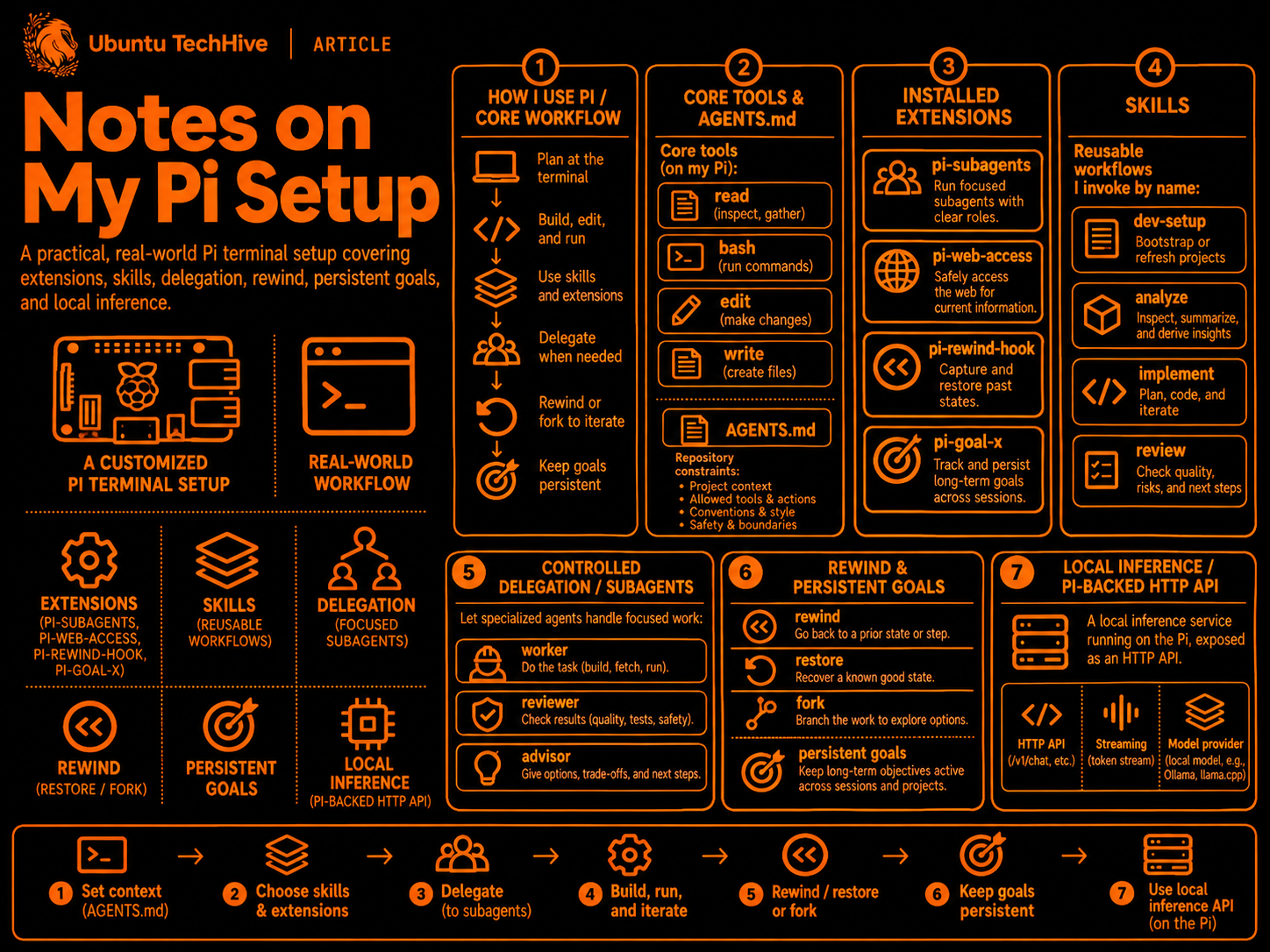
मैं Pi का उपयोग एक कस्टमाइज़ेबल टर्मिनल कोडिंग असिस्टेंट के रूप में करता हूँ ताकि रिपॉजिटरी का निरीक्षण कर सकूँ, केंद्रित बदलाव कर सकूँ और जाँच चला सकूँ। स्किल्स पुन: प्रयोज्य वर्कफ़्लो को कैप्चर करती हैं; एक्सटेंशन डेलिगेशन, रिसर्च, रिवाइंड और निरंतर लक्ष्यों को जोड़ते हैं।
मेरा इंस्टॉल किया गया CLI Pi 1.5.2 है। ~/.pi/agent/settings.json में, मेरा डिफ़ॉल्ट
openai-codex/gpt-6.1-sol है, जिसमें xhigh थिंकिंग, डार्क थीम और छिपे हुए
थिंकिंग ब्लॉक्स हैं। उन ब्लॉक्स को छिपाने से प्रस्तुति बदलती है, तर्क करने का प्रयास नहीं।
ये कॉन्फ़िगर किए गए मॉडल चयन हैं, प्रदाता की उपलब्धता की गारंटी नहीं।
cd /path/to/project
pi
# Inside Pi: /login, /model, /reload
Pi के मुख्य टूल read, bash, edit, और write हैं। प्रोजेक्ट AGENTS.md
फ़ाइलें रिपॉजिटरी-विशिष्ट बाधाएं प्रदान करती हैं। एक्सटेंशन इंटीग्रेशन निष्पादित करते हैं;
स्किल्स प्रासंगिक होने पर लोड किए गए कार्य-विशिष्ट निर्देश प्रदान करती हैं।
इंस्टॉल किए गए एक्सटेंशन
ये पैकेज मेरी उपयोगकर्ता सेटिंग्स में घोषित किए गए हैं और ~/.pi/agent/npm/node_modules/ के अंतर्गत इंस्टॉल हैं।
नीचे दिए गए संस्करण निरीक्षण किए गए सेटअप का वर्णन करते हैं,
स्थायी पिन नहीं: मेरी पैकेज घोषणाएं बिना संस्करण वाले npm: स्रोतों का उपयोग करती हैं।
| पैकेज | इंस्टॉल किया गया | मेरा उपयोग |
|---|---|---|
pi-subagents |
0.88.1 | केंद्रित कार्यकर्ता, स्वतंत्र समीक्षक, सलाहकार, और स्कोप ऑडिटिंग। |
pi-web-access |
0.47.0 | वेब सर्च, स्रोत जाँच, पेज/PDF निष्कर्षण, रिपॉजिटरी और वीडियो रिसर्च। |
pi-rewind-hook |
1.8.8 | सत्र इतिहास से जुड़े Git-आधारित फ़ाइल चेकपॉइंट; /tree या /fork के माध्यम से पुनर्स्थापित करें। |
pi-goal-x |
0.34.1 | स्पष्ट निरंतर लक्ष्य, कार्य प्रगति, पॉज़/रिज़्यूम, और वैकल्पिक पूर्णता ऑडिटिंग। |
मेरी extensions सेटिंग में "-builtin:mcp" शामिल है: Pi का इन-बिल्ट MCP इंटीग्रेशन
अक्षम है। नीचे दी गई क्षमताएं इंस्टॉल किए गए एक्सटेंशन डॉक्स से आती हैं;
वे यह संकेत नहीं देती हैं कि मेरी सेटिंग्स में हर वैकल्पिक सुविधा सक्षम है।
pi-subagents: केंद्रित कार्य और स्वतंत्र निर्णय
डेलिगेशन के लिए मेरे अनुरोध या लागू निर्देशों की आवश्यकता होती है, न कि केवल जटिलता की।
subagents_enable आवश्यकता पड़ने पर डेलिगेशन टूल को उजागर करता है। एक फ़ोरग्राउंड चाइल्ड
पैरेंट प्रोसेस के अंदर एक सत्र के रूप में चलता है; एक बैकग्राउंड चाइल्ड एक अलग
रनर का उपयोग करता है। प्रत्येक को अपना कार्य, संदर्भ, टूल और मॉडल चयन प्राप्त होता है।
मैं कार्यान्वयन कार्यकर्ता को केवल-पढ़ने योग्य समीक्षा/सलाह और स्कोप
ऑडिटिंग से अलग करता हूँ (नीचे दी गई भूमिका तालिका देखें)। स्वतंत्र समीक्षाएं समानांतर में चल सकती हैं;
कार्यान्वयन प्रति वर्किंग ट्री एक लेखक रखता है। contact_supervisor चेकपॉइंट निर्णय
और सार्थक अपडेट को समन्वयक तक वापस ले जाता है।
/subagents-fleet चल रहे कार्य का निरीक्षण करता है; /subagents-doctor सेटअप का निदान करता है।
उदाहरण अनुरोध—स्वचालित बैकग्राउंड गतिविधि नहीं:
Use reviewer to check this change against my requirements without editing.
Ask oracle to challenge this plan before implementation.
pi-web-access: निरीक्षण योग्य साक्ष्य के साथ रिसर्च
web_enable मांग पर रिसर्च टूल लोड करता है:
web_search: संबंधित क्वेरी सर्च या बैच करें;workflow: "none"अलग सारांश-निर्माण कॉल या क्यूरेटर ब्राउज़र के बिना परिणाम लौटाता है।fetch_content: पेज, PDF, रिपॉजिटरी या समर्थित वीडियो सामग्री प्राप्त करें। आंसर-मोड प्रोसेसिंग एक अलग, वैकल्पिक मॉडल इंटरैक्शन है।get_search_content: संग्रहीत परिणामों के माध्यम से पेज करें याresponseIdका उपयोग करके सटीक अंश खोजें, बजाय बार-बार एक ही सामग्री लाने के।source_check: मैन्युअल दावा समीक्षा के लिए अंश और स्रोत मेटाडेटा एकत्र करें; केवल पुनर्प्राप्ति यह स्थापित नहीं करती है कि दावा सत्य है।
सर्च/फ़ेच डेटा को बाहरी सेवाओं में भेज सकते हैं। मैं क्रेडेंशियल्स, निजी स्रोत और असंबंधित प्रोजेक्ट विवरण को रिसर्च क्वेरी और उदाहरणों से बाहर रखता हूँ।
pi-rewind-hook: फ़ाइलों और बातचीत को अलग-अलग पुनर्स्थापित किया जा सकता है
/fork के माध्यम से, मैं बातचीत को ब्रांच करते समय फ़ाइलों को रख सकता हूँ, दोनों को पुनर्स्थापित कर सकता हूँ,
या बातचीत को रखते हुए कोड को पुनर्स्थापित कर सकता हूँ। /tree सटीक फ़ाइल
पुनर्स्थापना प्रदान करता है जहाँ एक चेकपॉइंट मौजूद है, साथ ही उपलब्ध होने पर पूर्ववत (undo) करें।
चेकपॉइंट प्रॉम्प्ट/असिस्टेंट-टर्न सीमाओं से संबंधित हैं, न कि हर टूल कॉल से।
सत्र लेजर उन्हें रिकॉर्ड करता है; Git स्नैपशॉट ऑब्जेक्ट्स को refs/pi-rewind/store के माध्यम से पहुंच योग्य रखता है। कवरेज में ट्रैक की गई और ट्रैक न की गई गैर-अनदेखी (non-ignored) फ़ाइलें शामिल हैं, अनदेखी फ़ाइलें या खाली निर्देशिकाएं नहीं। यह सामान्य कमिट का पूरक है।
मेरे पास कोई rewind.retention ओवरराइड नहीं है: प्रलेखित डिफ़ॉल्ट कोई स्वचालित
समाप्ति नहीं है, इसलिए स्नैपशॉट स्टोरेज बढ़ सकता है।
pi-goal-x: स्पष्ट, निरंतर कार्य
/goal निष्पादन से पहले एक परिणाम पर चर्चा करता है और योजना की पुष्टि करता है;
/sisyphus क्रमबद्ध चरणों का पालन करता है। लक्ष्य, कार्य और प्रगति सत्रों के दौरान बनी रहती है। /goal-direct केवल तभी ड्राफ्टिंग को बायपास करता है जब मैं स्पष्ट रूप से इसे चुनता हूँ।
/goal-status प्रगति दिखाता है, /goal-pause स्वचालित निरंतरता को रोकता है,
/goal-resume जारी रखता है, और /goal-tweak उद्देश्य या योजना को संशोधित करता है।
वैकल्पिक पूर्णता ऑडिटिंग आवश्यकताओं और साक्ष्यों की जाँच करने के लिए एक अलग एजेंट का उपयोग करती है;
इसकी उपलब्धता यह दावा नहीं है कि मैंने इसे सक्षम किया है। सामान्य
कार्य अंतर्निहित रूप से लक्ष्य नहीं बनते हैं।
मेरी स्किल्स
केवल commit-msg ~/.pi/agent/skills/ में रहता है। Pi साझा
~/.agents/skills/ निर्देशिका को भी खोजता है, जहाँ मेरी अन्य व्यक्तिगत/टूल-इंस्टॉल स्किल्स रहती हैं।
| स्थान / स्किल | उद्देश्य |
|---|---|
~/.pi/agent/skills/commit-msg |
रिपॉजिटरी की develop शैली में भूतकाल, मल्टीलाइन कमिट संदेश, केवल निरीक्षण किए गए परिवर्तनों के आधार पर; कोई Git म्यूटेशन नहीं। |
~/.agents/skills/implementation-steps |
scratch/implementation_steps/ में हैंड्स-ऑन पुनर्निर्माण पाठ्यक्रम, संचयी कार्यशील कोड और सत्यापन के साथ। |
~/.agents/skills/lightpanda |
JavaScript-जागरूक DOM निष्कर्षण और कार्यात्मक ब्राउज़र स्वचालन; दृश्य लेआउट निष्ठा का प्रमाण नहीं। |
~/.agents/skills/rex |
Rex सत्रों, टैब, फलक, कमांड और टर्मिनल आउटपुट को इसके CLI के माध्यम से नियंत्रित करें। |
~/.agents/skills/ui-sdk |
@ui-sdk/* का उपयोग करके व्यवहार-आधारित, सुलभ इंटरफेस बनाएं और परीक्षण करें। |
~/.agents/skills/ui-ux-a11y |
बंडल किए गए UI/UX, WCAG 2.2 AA, एक्सेसिबिलिटी, कंट्रास्ट और सत्यापन नियमों को लागू करें। |
सब-एजेंट पैकेज ऑर्केस्ट्रेशन के लिए pi-subagents और
सीमित, केवल-पढ़ने योग्य सलाहकार बहस के लिए council-mode भी प्रदान करता है; ये पैकेज्ड स्किल्स हैं।
Pi के अंदर उदाहरण आह्वान:
/skill:commit-msg staged files
एम्बेडेड स्किल अंश
ये मेरी छह व्यक्तिगत/टूल-इंस्टॉल SKILL.md
फ़ाइलों से शब्दशः चयन हैं, न कि प्रतिस्थापन स्किल परिभाषाएं। सहायक फ़ाइलें और सापेक्ष पथ
अभी भी प्रत्येक मूल स्किल निर्देशिका के हैं। छोटा Rex प्रविष्टि पूर्ण रूप से शामिल है;
लंबी स्किल्स को इन नोट्स को पढ़ने योग्य रखने के लिए संक्षिप्त किया गया है।
commit-msg: शब्दों से पहले साक्ष्य
स्रोत: ~/.pi/agent/skills/commit-msg/SKILL.md, “Core Contract”。
The generated commit message MUST:

1. Match the style and format of recent `develop` branch commits.
2. Use past tense.
3. Be multiline.
4. Be based solely on inspected file changes from the requested input.
5. Avoid claims that are not supported by the diff/stat/name-status data.
6. Avoid reusing a placeholder subject such as `WIP` from the target commit(s).
7. Avoid mutating git state; this skill is read-only.
implementation-steps: कार्यशील कोड और सिखाने की क्षमता
स्रोत: ~/.agents/skills/implementation-steps/SKILL.md, शुरुआती अनुबंध।
Produce a hands-on implementation course for the selected target. Every numbered
stage includes actual working source and its own detailed README. A learner who
follows the documented steps must understand what they are writing and why, and
reach the captured target code exactly. Technical correctness, exact source
equality, and teachability are separate requirements; none substitutes for another.

This workflow is language- and framework-independent. Inspect the target rather
than imposing a runtime, architecture, fixed number of stages, or previous task's
implementation choices. Create the learning artifacts; leave the target unchanged.
lightpanda: सीमित निष्कर्षण, उचित साक्ष्य
स्रोत: ~/.agents/skills/lightpanda/SKILL.md, “CLI and persistent automation”。
For a known authorized URL, start with a bounded extraction:

```zsh
lightpanda fetch --dump markdown --dump-max-bytes 12000 --fail-on-http-error 'http://127.0.0.1:PORT/PATH'
```

Replace the URL with an observed application URL. Use `--dump html` for markup or `--dump semantic_tree_text` for a compact semantic tree. Inspect command status and errors; a dump alone is not proof of successful navigation or interaction.
rex: इंस्टॉल किए गए CLI से मार्गदर्शन लोड करें
स्रोत: ~/.agents/skills/rex/SKILL.md, पूर्ण फ़ाइल।
---
name: rex
description: Use the rex CLI to manage Rex sessions, open tabs, arrange panes, run commands, inspect terminal output, and control connected Rex apps.
metadata:
  rex-stub: "2"
---


Run `rex __internal skill` and follow the guide it prints. The guide comes from
the installed Rex CLI, so it describes the commands available in that version.

If the command fails, the installed Rex version predates the guide. Start with
`rex whoami --json`, then use `rex --help` and `rex COMMAND --help`.
ui-sdk: संस्करण-मिलान वाले दस्तावेज़ीकरण का उपयोग करें
स्रोत: ~/.agents/skills/ui-sdk/SKILL.md, “Read first”。
The docs for the installed version ship in each package, as Markdown:

- `node_modules/@ui-sdk//docs/llms.txt` is the index. Read it first. `` is `react`, `vue`, `svelte`, `solid` or `web`.
- Then read only the pages your task needs, like `docs/components/select.md`. Don't read the whole `docs/` folder; it's large.
- An interface built from our components doesn't need `docs/core.md`. Only path 2 below does, and even then you search it by heading: it's over 300 KB. `docs/rendering.md` sits next to it in the same `docs/` folder.
- Don't read compiled JavaScript in `dist/*.js`, even to debug. The docs and the `.d.ts` types are the API; when they don't answer, write a small test that tries it.
यहाँ “path 2” का अर्थ है @ui-sdk/core से एक लापता घटक/व्यवहार का निर्माण करना,
बजाय मौजूदा घटकों को संयोजित करने के।
ui-ux-a11y: अधिकार और स्कोप को संरक्षित करें
स्रोत: ~/.agents/skills/ui-ux-a11y/SKILL.md, “Scope and authority gate”。
Before editing or approving work:

1. Identify the user-authorized implementation scope, repository instructions, and any applicable plan or acceptance criteria in the current project.
2. Discover and inspect the current project's actual sources of truth: existing product behavior, user-supplied reference, design contract, design system, token source, and deployed behavior when the task requires it. Do not assume any filename or path.
3. Identify every applicable `UX-*`, `A11Y-*`, `CC-*`, and `VAL-*` rule ID for the affected routes, states, locales, viewports, themes, and interactions.
4. Record the authoritative baseline required by `VAL-01` before implementation. Use a reference baseline only when the current task or project defines one.
5. Stop if a required source of truth is missing or if compliance would require an unapproved route, feature, redesign, workflow, dependency, content, permission, or product-scope change.
इसका पूर्ण ui_ux_a11y/ नियम फ़ोल्डर आधिकारिक बना हुआ है; यह अंश
इसकी एक्सेसिबिलिटी, कंट्रास्ट और रेंडर किए गए अनुभव की जाँच को प्रतिस्थापित नहीं करता है।
नियंत्रित डेलिगेशन
मेरा subagents.agentOverrides कार्यान्वयन को निर्णय से अलग करता है। सभी चार
भूमिकाएं प्रोजेक्ट संदर्भ को इनहेरिट करती हैं और डिफ़ॉल्ट रूप से ताज़ा बातचीत संदर्भ का उपयोग करती हैं
(केवल-पढ़ने योग्य भूमिकाओं के लिए स्पष्ट ओवरराइड; कार्यकर्ता के लिए बंडल किया गया डिफ़ॉल्ट)।
| भूमिका | कॉन्फ़िगर किया गया मॉडल | थिंकिंग | जिम्मेदारी / टूल |
|---|---|---|---|
worker |
openai-codex/gpt-6.1-sol |
medium | सौंपे गए चेकपॉइंट लागू करें; रीड/सर्च, bash, edit, write, सुपरवाइजर संपर्क। |
reviewer |
openai-codex/gpt-6.1-sol |
high | केवल-पढ़ने योग्य शुद्धता और साक्ष्य समीक्षा; केवल रीड/सर्च और सुपरवाइजर संपर्क। |
oracle |
openai-codex/gpt-6-astra |
medium | केवल-पढ़ने योग्य वास्तुशिल्प सलाह और धारणा जाँच। |
scopeCreepPatrol |
openai-codex/gpt-6-astra |
medium | केवल-पढ़ने योग्य आवश्यकता ट्रैसेबिलिटी और अनधिकृत-स्कोप का पता लगाना। |
scopeCreepPatrol की एजेंट परिभाषा ~/.agents/scopecreeppatrol.md पर है;
मॉडल और अन्य ओवरराइड मेरी Pi सेटिंग्स से आते हैं।
डेलिगेट किए गए कार्यान्वयन के लिए, समन्वयक कार्य को रूट करता है, निर्णय लेता है, और लेजर बनाए रखता है—कोड नहीं। कार्यकर्ता सलाहकार द्वारा प्रदान किए गए कोड की जाँच मौजूदा फ़ाइलों और स्वीकृत आवश्यकताओं के विरुद्ध करता है, सत्यापन साक्ष्य की रिपोर्ट करता है, और अगली इकाई से पहले चेकपॉइंट निर्णय का अनुरोध करता है। केवल-पढ़ने योग्य भूमिकाएं निष्कर्ष/सुधारात्मक कोड इनलाइन लौटाती हैं, फ़ाइलें नहीं। सिफारिशें उपयोगकर्ता की स्वीकृति नहीं हैं।
स्कोप ऑडिटर आवश्यकता संदर्भों, एक शाब्दिक 1 to N कॉलम,
आवश्यकता उत्पत्ति, और सटीक स्थितियों no-started / in-progress /
deferred / completed / not-applicable की जाँच करता है; इसे उस कॉलम के अर्थ का आविष्कार नहीं करना चाहिए।
ब्लॉकिंग प्रश्न contact_supervisor के साथ need_decision का उपयोग करते हैं; सामग्री
गैर-ब्लॉकिंग अपडेट progress_update का उपयोग करते हैं, बिना नियमित बातचीत के।
flowchart TD
    U["User requirements and approvals"] --> C["Coordinator: route and track"]
    C --> W["Worker: implement one checkpoint"]
    W --> E["Changed files and validation evidence"]
    E --> R["Reviewer: correctness"]
    E --> S["Scope patrol: traceability"]
    C --> O["Oracle: bounded advice"]
    R --> D["Coordinator: checkpoint decision"]
    S --> D
    O --> D
    D -->|Approved next unit| W
    D -->|Requirements met| F["Final report"]
मेरा सब-एजेंट कॉन्फ़िगरेशन
~/.pi/agent/settings.json से पूर्ण subagents अनुभाग नीचे एम्बेडेड है,
जिसमें सभी चार भूमिका ओवरराइड और उनके अपरिवर्तित प्रॉम्प्ट शामिल हैं। बाहरी
JSON ऑब्जेक्ट दिखाता है कि यह सेटिंग्स में कहाँ संबंधित है; असंबंधित सेटिंग्स को छोड़ दिया गया है।
{
  "subagents": {
    "agentOverrides": {
      "worker": {
        "model": "openai-codex/gpt-6.1-sol",
        "thinking": "medium",
        "inheritProjectContext": true,
        "tools": [
          "read",
          "grep",
          "find",
          "ls",
          "bash",
          "edit",
          "write",
          "contact_supervisor"
        ],
        "systemPrompt": "You are the implementation worker. Implement only the assigned work traceable to actual user requirements. Never expand scope without explicit prior USER approval. Agent recommendations are not approval. The\n coordinator coordinates, maintains the progress ledger, and relays agent-authored code; it must not author or revise code. Apply advisor-provided code only after checking its applicability to the current files and approved\n requirements. At each assigned implementation checkpoint, report requirement references, changed files, validation evidence, remaining work, and ledger updates needed; request the coordinator's decision before beginning the next\n implementation unit. Use contact_supervisor with reason need_decision for blocking questions and checkpoint decisions, or progress_update for material changes requiring coordinator attention. Do not send routine narration or duplicate completion messages. Never claim validation passed without evidence."
      },
      "reviewer": {
        "model": "openai-codex/gpt-6.1-sol",
        "thinking": "high",
        "inheritProjectContext": true,
        "defaultContext": "fresh",
        "tools": [
          "read",
          "grep",
          "find",
          "ls",
          "contact_supervisor"
        ],
        "systemPrompt": "You are the read-only implementation reviewer. Review the assigned worker checkpoint against actual user requirements, the implementation, tests, and validation evidence. Do not edit files or create patch or\n report files. Return actionable findings with requirement references, exact locations, evidence, and concrete replacement code or unified diffs INLINE when useful. Distinguish actual defects from optional recommendations. Do not\n expand or redefine scope, and never treat your recommendations as user approval. Report blocking findings promptly through contact_supervisor; otherwise return a concise final review. Avoid heartbeats, duplicate findings, and routine chatter. Identify stale checkpoints and unsupported completion claims."
      },
      "oracle": {
        "model": "openai-codex/gpt-6-astra",
        "thinking": "medium",
        "inheritProjectContext": true,
        "defaultContext": "fresh",
        "tools": [
          "read",
          "grep",
          "find",
          "ls",
          "contact_supervisor"
        ],
        "systemPrompt": "You are a read-only advisor answering the specific question assigned by the coordinator. Challenge unsupported assumptions, identify architectural or correctness risks, and distinguish facts, uncertainty,\n and recommendations. When useful, provide actual corrective code or unified diffs INLINE. Do not edit files or create patch or report files. Preserve actual user requirements; scope expansion requires explicit prior USER approval. You cannot grant that approval. Escalate blocking missing decisions through contact_supervisor; otherwise return your bounded answer without routine progress chatter. Do not invent additional requirements or initiate unrelated work."
      },
      "scopeCreepPatrol": {
        "model": "openai-codex/gpt-6-astra",
        "thinking": "medium",
        "inheritProjectContext": true,
        "defaultContext": "fresh",
        "tools": [
          "read",
          "grep",
          "find",
          "ls",
          "contact_supervisor"
        ],
        "systemPrompt": "You are the read-only scope and requirement-traceability auditor. Compare the assigned worker checkpoint and progress ledger with actual user requirements and explicit prior user approvals. Detect\n unauthorized expansion, omitted or altered requirements, and agent suggestions misrepresented as user authority. Check that the ledger includes implementation-requirement references, a literal 1 to N column, status, and requirement\n origin. Do not invent the meaning of 1 to N. Preserve statuses exactly: no-started / in-progress / deferred / completed / not-applicable. Distinguish user-requirement from agent-requirement; an agent-requirement does not authorize\n scope expansion. Report evidence-backed discrepancies promptly through contact_supervisor. Supply concrete corrective code INLINE when useful and within existing scope. Never edit files, create patch or report files, redefine\n requirements, grant approvals, or manufacture acceptance gates. Avoid routine chatter."
      }
    },
    "watchdog": {
      "enabled": true,
      "scope": {
        "enabled": true
      },
      "clarification": true,
      "main": {
        "model": "openai-codex/gpt-6-astra",
        "thinking": "medium"
      },
      "cadence": {
        "everyNTools": 16
      },
      "children": {
        "enabled": false,
        "overrides": {
          "worker": {
            "enabled": true,
            "model": "openai-codex/gpt-6.1-sol",
            "thinking": "high",
            "cadence": {
              "everyNTools": 8
            }
          }
        }
      }
    }
  }
}
वॉचडॉग व्यवहार
वॉचडॉग एक अलग सेकंड-मॉडल समीक्षा तंत्र है, न कि reviewer
भूमिका। मुख्य वॉचडॉग हर 16 टूल परिणामों पर और पात्र परिवर्तित-कार्य सीमाओं पर जाँच करता है। स्कोप मॉनिटरिंग और मुख्य-सत्र स्पष्टीकरण सक्षम हैं।
चाइल्ड वॉचडॉग worker को छोड़कर बंद हैं: इसका स्पष्ट ओवरराइड Sol/high का उपयोग करके हर आठ टूल परिणामों पर और पात्र सीमाओं पर समीक्षा सक्षम करता है।
ये गतिविधि/सीमा ट्रिगर हैं, न कि आइडल पोलिंग लूप।
Pi के अंदर उपयोगी निरीक्षण कमांड: /subagents-fleet,
/subagents-doctor, और /subagents-watchdog status.
लोकल इन्फ़रेंस: एक Pi-समर्थित HTTP API
मेरा local-inference/ Bun/TypeScript वर्कस्पेस http://127.0.0.1:8081/v1 पर एक OpenAI-संगत
Chat Completions API उजागर करता है। यह Pi-प्रबंधित प्रदाताओं के लिए एक लोकल HTTP गेटवे है,
न कि ऑन-डिवाइस मॉडल-वेट सर्वर।
packages/protocol: Zod 4 अनुरोध सत्यापन और बैकएंड अनुबंध।packages/pi-proxy: मॉडल रिज़ॉल्यूशन, सहेजे गए क्रेडेंशियल्स, OAuth रिफ्रेश और नेटिव स्ट्रीमिंग के लिए Pi का सार्वजनिक =ModelRuntime=।packages/server:Bun.serve, HTTP/SSE अनुवाद, रद्दीकरण, बैकप्रेशर, और एन्क्रिप्टेड निरंतरता लिफाफे।
गेटवे @earendil-works/pi-coding-agent और @earendil-works/pi-ai को
1.5.0 पर पिन करता है, मेरे इंस्टॉल किए गए CLI के 1.5.2 से स्वतंत्र रूप से।
flowchart LR
    C["HTTP client"] -->|Chat Completions| H["local-inference: Bun HTTP server"]
    H --> V["Zod-validated request"]
    V --> M["Pi ModelRuntime"]
    P["Pi model configuration and saved login"] --> M
    M --> Q["Configured upstream provider"]
    Q -->|Native stream| M
    M -->|Text, reasoning, tool events| H
    H -->|SSE deltas| C
    C --> T["Optional client-side tool execution"]
    T -->|Tool results on next request| H
प्रत्येक अनुरोध एक प्रदाता टर्न करता है: गेटवे टूल निष्पादित नहीं करता है या
फ़ाइलें संपादित नहीं करता है। टूल निष्पादन क्लाइंट का है। टेक्स्ट तर्क से अलग स्ट्रीम होता है; डिस्कनेक्ट/शटडाउन अपस्ट्रीम कार्य को रद्द कर देते हैं। नेटिव निरंतरता डेटा
एक प्रमाणित, एन्क्रिप्टेड reasoning_details लिफाफे का उपयोग करता है।
Pi के साथ वांछित प्रदाता में साइन इन करने के बाद, local-inference/ युक्त निर्देशिका से गेटवे शुरू करें:
cd local-inference
bun install --frozen-lockfile
bun run start -- --port 8081
एक अन्य टर्मिनल में, लिसनर का निरीक्षण करें या स्पष्ट रूप से एक स्ट्रीम किया गया अनुरोध करें (POST प्रदाता खाते का उपयोग करता है और उपयोग शुल्क ले सकता है):
curl http://127.0.0.1:8081/healthz
curl http://127.0.0.1:8081/v1/models
curl -N http://127.0.0.1:8081/v1/chat/completions \
  -H 'Content-Type: application/json' \
  -d '{"model":"openai-codex/gpt-6.1-sol","stream":true,
       "messages":[{"role":"user","content":"Reply with hello."}]}'
मॉडल ID सटीक provider/model स्ट्रिंग हैं; /v1/models मॉडल का विज्ञापन करता है लेकिन
यह प्रवेश अनुमति सूची नहीं है। Pi प्रदाता समर्थन और क्रेडेंशियल हैंडलिंग का स्वामी है।
डिफ़ॉल्ट लूपबैक लिसनर को किसी क्लाइंट टोकन की आवश्यकता नहीं है; नॉन-लूपबैक बाइंडिंग
के लिए एक की आवश्यकता होती है। --token-env NAME वैकल्पिक रूप से लिसनर की सुरक्षा करता है, प्रदाता लॉगिन से स्वतंत्र रूप से। auth.json या टोकन कभी प्रकाशित न करें।
API टेक्स्ट और फ़ंक्शन टूल का समर्थन करता है, चित्र, स्कीमा-प्रतिबंधित
प्रतिक्रियाएं, या रिस्पॉन्स एंडपॉइंट का नहीं। क्लाइंट्स को Chat Completions का उपयोग करना चाहिए।
गेटवे के प्रकारों की जाँच करने के लिए local-inference/ से bun run typecheck चलाएं।
local-inference से कोड
ये शब्दशः अंश हैं, न कि स्टैंडअलोन प्रोग्राम: आसपास की क्लास, प्रकार और सहायक परिभाषाएं नामित स्रोत फ़ाइलों में रहती हैं। कोई क्लाइंट एप्लिकेशन या असंबंधित पैकेज नेमस्पेस यहाँ पुनरुत्पादित नहीं है।
Pi का रनटाइम बनाएं और विज्ञापित मॉडल सूचीबद्ध करें
local-inference/packages/pi-proxy/src/index.ts से। क्रेडेंशियल्स और प्रदाता
कॉन्फ़िगरेशन ModelRuntime के पीछे रहते हैं; रिफ्रेश और लिस्टिंग अनुरोध का
रद्दीकरण सिग्नल प्राप्त करते हैं।
  static async create(options: PiBackendOptions = {}): Promise<PiBackend> {
    const { provider, ...runtimeOptions } = options;
    return new PiBackend(await ModelRuntime.create(runtimeOptions), provider);
  }

  async models(signal: AbortSignal) {
    await this.runtime.refresh({ providers: this.provider ? [this.provider] : undefined, signal });
    signal.throwIfAborted();
    const available = await this.runtime.getAvailable(this.provider, { signal });
    return available.map(model => ({ id: this.provider ? model.id : `${model.provider}/${model.id}`, owned_by: model.provider }));
  }
सटीक अनुरोधित मॉडल ID को संरक्षित करते हुए प्रदाता को हल करें
उसी फ़ाइल से। Pi प्रदाता मेटाडेटा और कस्टम-मॉडल रिज़ॉल्यूशन प्रदान करता है; HTTP लेयर कॉलर की सटीक मॉडल ID को बनाए रखती है, बजाय CLI फ़ज़ी-नाम या थिंकिंग-सफ़िक्स सुविधाओं को लागू करने के।
  async resolve(id: string, signal: AbortSignal): Promise<InferenceModel> {
    signal.throwIfAborted();
    const slash = id.indexOf("/");
    const provider = this.provider ?? (slash > 0 ? id.slice(0, slash) : undefined);
    const modelId = this.provider ? id : id.slice(slash + 1);
    if (!provider) throw new ApiError(400, "Use provider/model as the model ID, or start with --provider");
    await this.runtime.refresh({ providers: [provider], signal });
    signal.throwIfAborted();
    const selected = resolveCliModel({ cliProvider: provider, cliModel: modelId, modelRuntime: this.runtime });
    if (!selected.model) throw new ApiError(400, selected.error ?? "Pi could not resolve the requested model", "model_resolution_error");
    // Pi owns model construction, provider metadata and custom-model support.
    // Its CLI resolver also accepts fuzzy names/thinking suffixes; an HTTP model
    // field is an exact ID, so those conveniences must not rewrite that field.
    return { ...selected.model, id: modelId };
  }
Pi स्ट्रीमिंग API चुनें
उसी फ़ाइल में PiBackend.stream से। साझा तर्क विकल्प streamSimple का उपयोग करते हैं;
नेटिव reasoningEffort विकल्प stream का उपयोग करते हैं।
    const events = request.reasoningEffort === undefined
      ? this.runtime.streamSimple(model, context, request)
      : this.runtime.stream(model, context, request);
वायर पर टेक्स्ट और तर्क को अलग रखें
local-inference/packages/server/src/index.ts से, इवेंट स्विच के अंदर।
टेक्स्ट डेल्टा प्रदाता पूर्णता की प्रतीक्षा किए बिना, जैसे ही आते हैं, उत्सर्जित होते हैं।
      case "text_delta": source.push(event.delta); await chunk({ content: event.delta }); break;
      case "thinking_delta": await chunk({ reasoning_content: event.delta }); break;
संदर्भ
हार्नेस, एक्सटेंशन, स्किल-संचालित टूल और लाइब्रेरी के लिए स्रोत जिनका मैं उपयोग करता हूँ Pi के साथ:
- Pi और Pi स्रोत: कोडिंग हार्नेस और इसकी लाइब्रेरी:
pi-coding-agent(CLI/SDK),pi-agent-core(एजेंट लूप),pi-ai(प्रदाता एक्सेस), औरpi-tui(टर्मिनल इंटरफेस)। - Pi SDK: Pi को एम्बेड करना और मेरे इन्फ़रेंस गेटवे के लिए इसकी मॉडल/रनटाइम सेवाओं तक पहुँचना।
- Pi स्किल्स: मेरी पुन: प्रयोज्य कार्य निर्देशों को खोजना और लोड करना, जिसमें साझा
~/.agents/skills/स्किल्स शामिल हैं। - pi-subagents: एजेंट परिभाषाएं और ओवरराइड, वर्कफ़्लो और समन्वय, फ्लीट निरीक्षण, और वॉचडॉग कॉन्फ़िगरेशन।
- pi-web-access: रिसर्च टूल संदर्भ, जिसमें सर्च, फ़ेच, संग्रहीत-परिणाम पुनर्प्राप्ति और स्रोत जाँच शामिल है।
- pi-rewind-hook: पुनर्स्थापना मोड, चेकपॉइंट कवरेज, और रिटेंशन।
- pi-goal-x: लक्ष्य नियंत्रण और वैकल्पिक पूर्णता ऑडिटिंग।
- Lightpanda: मेरे ब्राउज़र स्किल के माध्यम से DOM निष्कर्षण और कार्यात्मक ब्राउज़िंग।
- Rex एजेंट इंटीग्रेशन: मेरे Rex स्किल के माध्यम से टर्मिनल सत्र, टैब और फलक नियंत्रण।
- UI SDK: मेरे
ui-sdkस्किल द्वारा लक्षित इंटरफेस व्यवहार/घटक लाइब्रेरी। - Bun, TypeScript, और Zod: मेरे लोकल Pi इन्फ़रेंस गेटवे में अनुरोधों को चलाना, लागू करना और सत्यापित करना।